Bluetooth Battery Bar
I made this because I hated finding out about my mouse battery only after the mouse had died. It shows keyboard, mouse, and AirPods battery levels together in the menu bar, and lets you know when they run low.
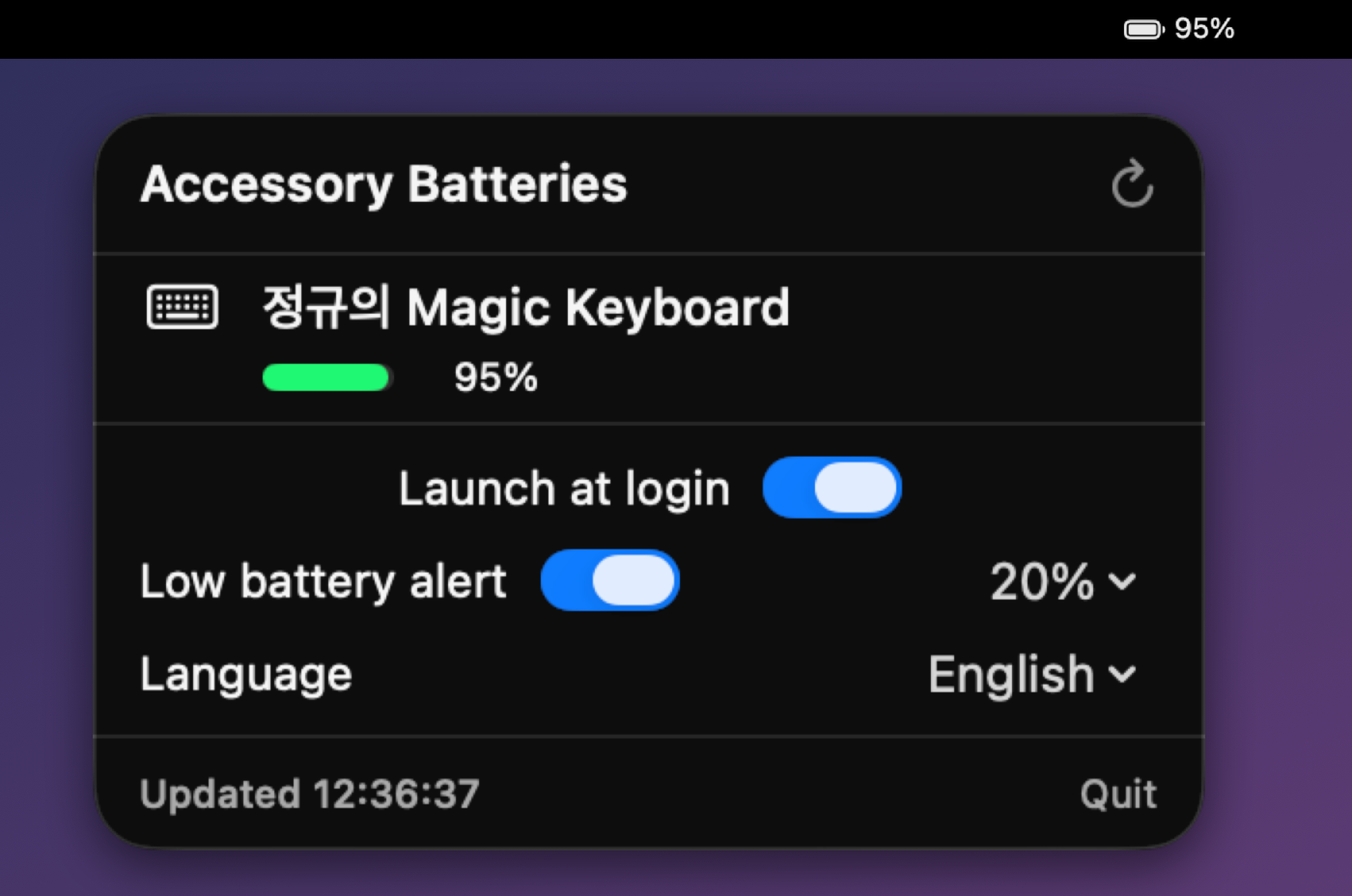
Key features
- Menu bar display: Shows the lowest battery level across all your devices, along with an icon. Click it to open a list broken down by device.
- Supported devices: Shows keyboards, mice, trackpads, AirPods (left, right, and case), and Bluetooth devices from other manufacturers.
- Automatic refresh: Refreshes every 2 minutes, and you can refresh right away with the refresh button.
- Low battery alerts: Lets you know when a battery falls below the level you pick: 10, 15, 20, 30, or 40%. If it recovers to at least 5% above that level and then falls again, you get another alert.
- Launch at login: One toggle turns it on and off.
- Language: Switch between English, Korean, and Japanese regardless of your system language.
Installation
Requires macOS 13 or later.
- Mac App Store (recommended): Click Get to install it, and future updates are automatic too.
- DMG: Open the file and move the app to your Applications folder. It’s notarized by Apple, so it runs without warnings, but you’ll need to download each new version from this page again.
If you install both versions, you may see two icons in the menu bar. Please keep just one.
How it works
With no extra permissions or background programs, it combines information from two places built into macOS.
| Source | Devices it reads |
|---|---|
| IORegistry | Magic Keyboard, Mouse, Trackpad |
system_profiler |
AirPods, devices from other manufacturers |
It doesn’t collect data or connect to the network. You can read more in the privacy policy.
Update history
v1.0.0
Now on the Mac App Store
- You can get it for free on the Mac App Store.
- The App Store version updates automatically. The DMG download is still available too.
- A build with App Sandbox enabled passed Apple's review.
v1.0.0
Apple-notarized build
- Signed with Developer ID and notarized, so the "unidentified developer" warning no longer appears.
- Added IORegistry lookups. Magic Keyboard, Mouse, and Trackpad are read more directly, and AirPods and devices from other manufacturers are shown as well.
- Merged entries so the same device doesn't appear twice.
- Fixed the launch at login toggle so it works properly on macOS 13 too.
v1.0
First public release
- Check the battery of connected Bluetooth devices from the menu bar. AirPods show left, right, and case separately.
- The menu bar icon shows the lowest battery level.
- Refreshes automatically every 2 minutes, and you can refresh right away with the refresh button.
- Supports launch at login and low battery alerts.
- Switch between English, Korean, and Japanese right in the app.
If something is wrong or you have a question, see the Support page.