Bluetooth Battery Bar for macOS — Bluetooth Device Battery in Your Menu Bar
Bluetooth Battery Bar shows the battery level of your Bluetooth keyboard, mouse, trackpad and AirPods in the macOS menu bar. Free on the Mac App Store, notarized DMG also available. 연결된 블루투스 기기 배터리를 macOS 메뉴바에서 확인하는 무료 앱 — 한국어·English·日本語.
Bluetooth Battery Bar — 연결된 블루투스 기기들의 배터리 상태를 macOS 메뉴바에서 한눈에 보는 앱입니다. 메뉴바 아이콘은 전체 기기 중 가장 낮은 배터리 수준을 반영합니다. / See the battery level of every connected Bluetooth device in the macOS menu bar. / 接続中の Bluetooth デバイスのバッテリー残量を macOS のメニューバーで確認できます。
🎉 Mac App Store 등록 완료 — 이제 App Store에서 무료로 받을 수 있습니다. / Now available for free on the Mac App Store. / Mac App Store で無料公開されました。 Bluetooth Battery Bar - jklee
🌐 언어 / Language / 言語 — 한국어 · English · 日本語
다운로드 / Download
🍎 Mac App Store (권장 / recommended / 推奨)
Mac App Store에서 받기 — Bluetooth Battery Bar
- 무료 / Free / 無料 · Requires: macOS 13+ · Size: ~360KB · Category: 유틸리티
- App Store 버전은 자동 업데이트를 지원하며, Apple 심사를 통과한 샌드박스 빌드입니다. / The App Store build auto-updates and is sandboxed & App Review approved. / App Store 版は自動アップデートに対応し、App Review を通過したサンドボックスビルドです。
- 앱 이름은 App Store에서 Bluetooth Battery Bar - jklee 로 표시됩니다. / Listed as Bluetooth Battery Bar - jklee on the App Store. / App Store では Bluetooth Battery Bar - jklee として掲載されています。
⬇️ 직접 다운로드 / Direct download (DMG)
⬇️ BatteryBar.dmg (v1.0.0, ~464KB)
- Version: 1.0.0 · Requires: macOS 13+ · Format: DMG
- ✅ Apple 공증(notarization) 완료 — Developer ID 서명 + 스테이플까지 끝난 빌드라, 다운로드 후 바로 실행됩니다. 별도 보안 설정이 필요 없습니다. / Notarized by Apple — no security workaround needed. / Apple の公証済み — セキュリティ設定の変更は不要です。
- DMG를 열면 3개국어 안내 파일(
먼저 읽어주세요 — READ ME.txt)이 함께 들어 있습니다. / A trilingual guide (READ ME.txt) is included inside the DMG. / DMG 内に3か国語の案内ファイルが同梱されています。 - DMG 버전은 자동 업데이트가 없으므로 새 버전은 이 페이지에서 다시 받아야 합니다. / The DMG build has no auto-update — grab new versions from this page. / DMG 版は自動アップデートがないため、新バージョンはこのページから再取得してください。
개인정보 / Privacy: 데이터 수집 없음 · 네트워크 접근 없음 · 분석 없음 / No data collection. No network access. No analytics. / データ収集なし・ネットワークアクセスなし・分析なし。
한국어
연결된 블루투스 키보드·마우스·트랙패드·AirPods(좌/우/케이스) 등의 배터리를 macOS 메뉴바에 표시합니다.
주요 기능
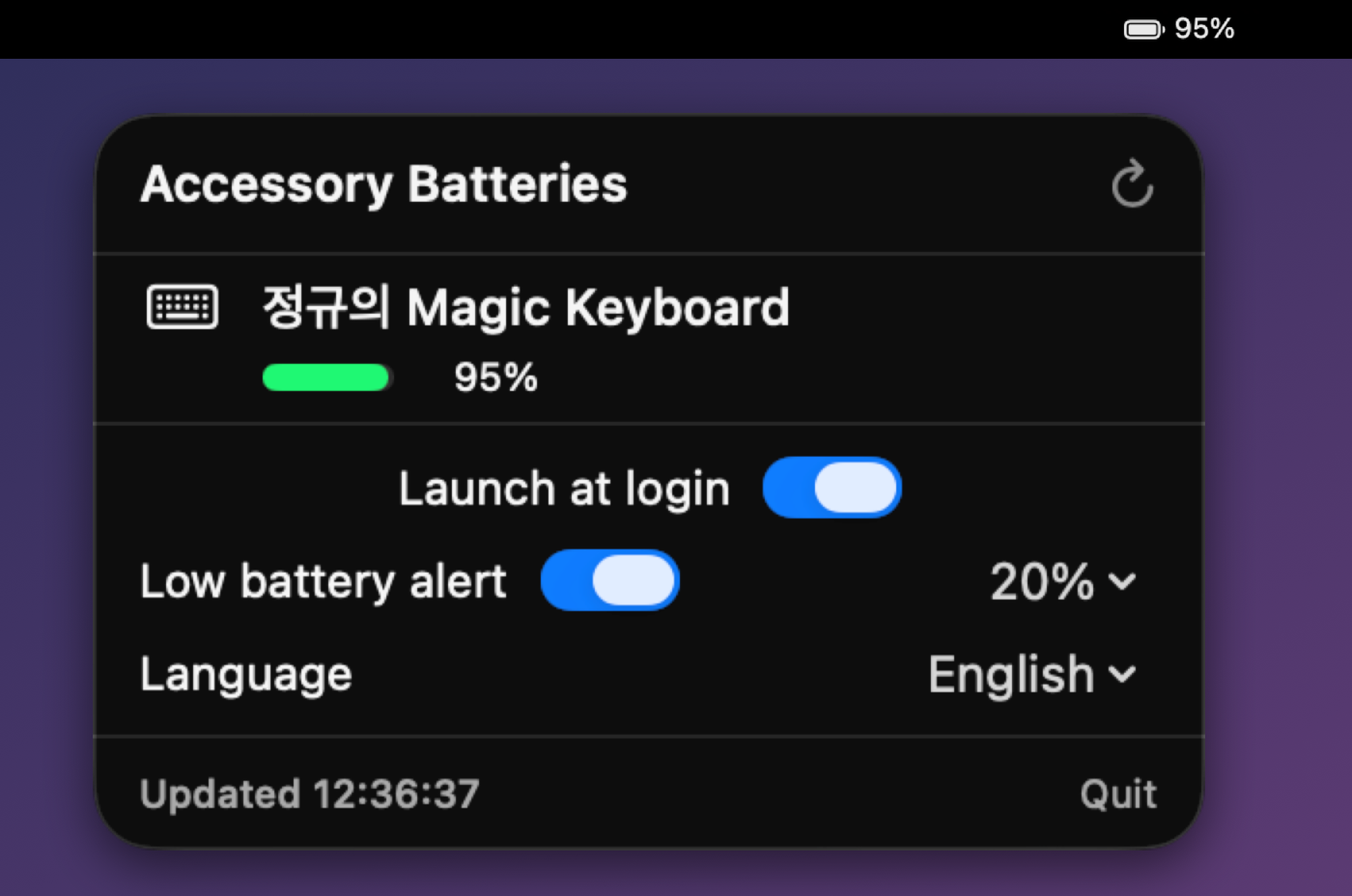
- 🔋 메뉴바에 최저 배터리 % + 아이콘 표시, 클릭하면 기기별 목록이 펼쳐집니다.
- 🔄 새로고침 버튼으로 즉시 갱신 (자동으로 2분마다 갱신)
- 🚀 로그인 시 자동 실행 토글
- 🔔 저배터리 알림 — 임계값(10/15/20/30/40%) 이하로 떨어지면 알림. 회복(임계값+5%) 후 다시 떨어지면 재알림.
- 🌐 언어 전환 — English(기본) / 한국어 / 日本語 실시간 전환 (시스템 언어와 무관)
설치 방법
방법 1 — Mac App Store (권장)
- Mac App Store 페이지에서 받기를 누릅니다.
- 설치가 끝나면 Launchpad 또는 응용 프로그램 폴더에서 실행합니다.
- 메뉴바 우측에 배터리 아이콘 + 최저 배터리 %가 나타납니다. 이후 업데이트는 App Store가 자동으로 처리합니다.
방법 2 — DMG 직접 설치
- 위에서 BatteryBar.dmg 를 다운로드합니다.
- DMG를 열고 BatteryBar 를 응용 프로그램(Applications) 폴더로 드래그합니다.
- 응용 프로그램 폴더에서 BatteryBar 를 더블클릭하면 메뉴바 우측에 배터리 아이콘 + 최저 배터리 %가 나타납니다.
DMG 버전도 Apple 공증을 받았으므로 “확인되지 않은 개발자” 경고가 나오지 않습니다. 예전 버전(v1.0 ad-hoc 서명본)을 받으셨다면 새로 받아 덮어써 주세요.
두 버전을 함께 설치하면 메뉴바에 아이콘이 두 개 보일 수 있습니다. App Store 버전으로 옮겨가실 때는 기존 DMG 설치본을 삭제해 주세요.
로그인 항목과 알림은 앱을
/Applications로 옮긴 뒤 실행하는 것을 권장합니다.
English
Shows the battery level of connected Bluetooth devices — keyboard, mouse, trackpad, AirPods (left/right/case) — right in the macOS menu bar. The menu-bar icon reflects the lowest battery among all devices.
Features
- 🔋 Menu-bar icon shows the lowest battery %; click to expand the per-device list.
- 🔄 Refresh button for instant updates (auto-refreshes every 2 minutes).
- 🚀 Launch at login toggle.
- 🔔 Low-battery alerts — notifies when a device drops below the threshold (10/15/20/30/40%). Re-arms after recovery (threshold + 5%).
- 🌐 Language switch — English (default) / 한국어 / 日本語, switchable live (independent of system language).
Installation
Option 1 — Mac App Store (recommended)
- Open the Mac App Store page and click Get.
- Launch it from Launchpad or the Applications folder once installed.
- The battery icon and lowest battery % appear on the right side of the menu bar. Future updates are handled automatically by the App Store.
Option 2 — Direct DMG install
- Download BatteryBar.dmg above.
- Open the DMG and drag BatteryBar into your Applications folder.
- Double-click BatteryBar in the Applications folder. The battery icon and lowest battery % appear on the right side of the menu bar.
The DMG build is notarized by Apple too, so no “unidentified developer” warning appears. If you downloaded the earlier ad-hoc signed v1.0 build, replace it with this one.
Running both builds at once can show two menu-bar icons. If you switch to the App Store version, delete the DMG install first.
Moving the app to
/Applicationsbefore first launch is recommended so login-item and notification paths stay stable.
日本語
接続中の Bluetooth デバイス(キーボード・マウス・トラックパッド・AirPods(左/右/ケース)など)のバッテリー残量を macOS のメニューバーに表示します。メニューバーのアイコンは全デバイスのうち 最も低いバッテリー残量 を反映します。
主な機能
- 🔋 メニューバーに 最低バッテリー % とアイコンを表示。クリックでデバイス一覧が開きます。
- 🔄 更新 ボタンで即時更新(2分ごとに自動更新)。
- 🚀 ログイン時に自動起動 トグル。
- 🔔 低バッテリー通知 — しきい値(10/15/20/30/40%)を下回ると通知。回復(しきい値+5%)後に再度下がると再通知。
- 🌐 言語切替 — English(既定)/ 한국어 / 日本語 をリアルタイムで切替(システム言語とは無関係)。
インストール方法
方法 1 — Mac App Store(推奨)
- Mac App Store のページで 入手 をクリックします。
- インストール後、Launchpad またはアプリケーションフォルダから起動します。
- メニューバー右側にバッテリーアイコンと最低バッテリー % が表示されます。以降のアップデートは App Store が自動で行います。
方法 2 — DMG から直接インストール
- 上の BatteryBar.dmg をダウンロードします。
- DMG を開き、BatteryBar を アプリケーション(Applications) フォルダへドラッグします。
- アプリケーションフォルダで BatteryBar をダブルクリックすると、メニューバー右側にバッテリーアイコンと最低バッテリー % が表示されます。
DMG 版も Apple の公証を受けているため、「未確認の開発元」の警告は表示されません。 以前の ad-hoc 署名版(v1.0)をダウンロードした方は、こちらで置き換えてください。
両方を同時にインストールすると、メニューバーにアイコンが2つ表示される場合があります。App Store 版へ移行する際は、DMG 版を削除してください。
ログイン項目と通知は、アプリを
/Applicationsに移してから起動することを推奨します。
동작 방식 / How it works / 仕組み
배터리 데이터는 macOS 내장 소스 두 곳을 합쳐서 얻습니다. 어느 한쪽도 단독으로는 모든 기기를 커버하지 못합니다. 별도 권한이나 백그라운드 데몬은 필요 없습니다. / Battery data is merged from two built-in macOS sources — neither covers every device on its own. No special permissions or background daemon required. / バッテリー情報は macOS 標準の2つのソースを統合して取得します。どちらか一方だけでは全デバイスを網羅できません。特別な権限やバックグラウンドデーモンは不要です。
| 소스 / Source | 커버리지 / Coverage |
|---|---|
IORegistry (AppleDeviceManagementHIDEventService 의 BatteryPercent) | Magic Keyboard / Mouse / Trackpad |
system_profiler SPBluetoothDataType -json | AirPods (Case/Left/Right) 및 서드파티 기기 |
system_profiler SPBluetoothDataType -json
기술 스택 / Tech stack: Swift + SwiftUI (MenuBarExtra, LSUIElement=true) · IOKit (IORegistry 조회) · ServiceManagement (SMAppService, launch at login) · UserNotifications (UNUserNotificationCenter, 5% hysteresis).
배포 / Distribution
- Mac App Store: Xcode archive → App Sandbox 적용 → App Store Connect 업로드 → App Review 통과 → 배포.
- DMG (직접 배포): Xcode archive → Developer ID Application 서명 →
notarytool공증 →stapler스테이플 → DMG.
업데이트 이력 / Changelog / 更新履歴
버전은 유의적 버전(SemVer)을 따릅니다. / Versioning follows SemVer. / バージョンは SemVer に従います。
2026-07-30 — Mac App Store 등록 / App Store release / App Store 公開
🇰🇷 한국어
- Mac App Store 등록 완료 — Bluetooth Battery Bar - jklee 로 무료 배포합니다. macOS 13 이상, 약 360KB.
- App Store 버전은 자동 업데이트를 지원합니다. DMG 직접 다운로드도 계속 유지됩니다.
- App Sandbox를 적용한 빌드로 Apple 심사를 통과했습니다. 데이터 수집·네트워크 접근·분석 없음.
🇺🇸 English
- Released on the Mac App Store — free download as Bluetooth Battery Bar - jklee. Requires macOS 13+, ~360KB.
- The App Store build auto-updates. The direct DMG download remains available.
- Shipped as a sandboxed build approved through App Review. No data collection, no network access, no analytics.
🇯🇵 日本語
- Mac App Store で公開 — Bluetooth Battery Bar - jklee として無料配布します。macOS 13 以降、約360KB。
- App Store 版は自動アップデートに対応します。DMG の直接ダウンロードも継続します。
- App Sandbox を適用したビルドで App Review を通過しました。データ収集・ネットワークアクセス・分析はありません。
v1.0.0 — 2026-07-24 (공증판 / notarized build / 公証版)
🇰🇷 한국어
- Apple 공증 완료 — Developer ID 서명 + notarization + staple. “확인되지 않은 개발자” 경고와
xattr우회 안내가 더 이상 필요 없습니다. - IORegistry 기반 조회 추가 — Magic Keyboard / Mouse / Trackpad를
system_profiler없이도 읽습니다. 기존system_profiler조회와 병합해 AirPods·서드파티 기기까지 함께 표시합니다. - 같은 기기가 두 소스에서 중복으로 잡히지 않도록 주소 형식을 정규화해 병합.
- 로그인 항목 토글을 macOS 13에서도 안전하게 동작하도록 수정.
🇺🇸 English
- Notarized by Apple — Developer ID signature + notarization + staple. The “unidentified developer” warning and the
xattrworkaround are gone. - Added an IORegistry data source — reads Magic Keyboard / Mouse / Trackpad without
system_profiler, and merges with the existingsystem_profilerlookup so AirPods and third-party devices still show up. - Device addresses are normalized so the same device never appears twice when both sources report it.
- Fixed the launch-at-login toggle to work correctly on macOS 13.
🇯🇵 日本語
- Apple の公証を取得 — Developer ID 署名 + notarization + staple。「未確認の開発元」警告と
xattrの回避手順は不要になりました。 - IORegistry からの取得を追加 —
system_profilerなしで Magic Keyboard / Mouse / Trackpad を読み取り、既存のsystem_profiler取得と統合して AirPods やサードパーティ製デバイスも表示します。 - 両ソースが同じデバイスを報告しても重複しないようアドレス形式を正規化。
- ログイン時に自動起動のトグルを macOS 13 でも正しく動作するよう修正。
v1.0 — 2026-07-18
첫 공개 릴리스 / First release / 初リリース
🇰🇷 한국어
- 메뉴바에서 연결된 Bluetooth 기기들의 배터리를 한눈에 확인.
- 기기별 아이콘 + 배터리 막대(초록/주황/빨강) 표시. AirPods 등은 왼쪽 / 오른쪽 / 케이스 개별 표시.
- 메뉴바 아이콘이 가장 낮은 배터리를 반영하고 옆에 최저 % 숫자 표시.
- 2분마다 자동 갱신 + 수동 새로고침 버튼.
- 로그인 시 자동 실행 토글, 저배터리 알림(임계값 10/15/20/30/40%, 회복 후 재알림).
- 언어 전환 — English(기본) / 한국어 / 日本語, 시스템 언어와 무관하게 앱 내에서 즉시 전환.
🇺🇸 English
- See the battery level of every connected Bluetooth device right from the menu bar: keyboards, mice, trackpads, and AirPods (left / right / case shown separately).
- Per-device icon + battery bar (green/orange/red). The menu-bar icon reflects the lowest battery and shows its percentage.
- Auto-refresh every 2 minutes + manual refresh button.
- Launch at login toggle, low-battery notifications with an adjustable threshold (10/15/20/30/40%, re-arms after recovery).
- Language options — English (default) / Korean / Japanese, switchable in-app regardless of system language.
🇯🇵 日本語
- 接続中のすべての Bluetooth デバイス(キーボード・マウス・トラックパッド・AirPods の左/右/ケース)のバッテリー残量をメニューバーから確認。
- デバイスごとのアイコン + バッテリーバー(緑/橙/赤)。メニューバーのアイコンは最も低いバッテリーを反映し、パーセントも表示。
- 2分ごとの自動更新 + 手動更新ボタン。
- ログイン時に自動起動 トグル、低バッテリー通知(しきい値 10/15/20/30/40%、回復後に再通知)。
- 言語切替 — English(既定)/ 한국어 / 日本語、システム言語とは無関係にアプリ内で即時切替。
